

Logging in with TData means having compatible Telegram Desktop software read existing local session data. It does not mean pasting a file into the phone-number or password field. This guide covers the official Windows portable client: quit the target client, extract the complete files, check the working directory, then launch the correct executable and inspect the result.
Use account files you are authorized to access. Restoring access depends on complete data, software compatibility and a session that is still valid; a folder does not guarantee verification-free sign-in. If you only have a phone or have not chosen a delivery format, start with the Telegram account buying and delivery-format guide.
What is TData? Separate files from verification information
tdata is Telegram Desktop’s local data directory. It stores account authorization data, client settings and other local information. A listing supplying TData generally means an archive of that directory. It is neither the client installer nor proof that a SIM, permanent access to verification codes or a complete chat export is included.
| Item | Purpose | Do not assume |
|---|---|---|
| TData folder | Local data and existing sessions for compatible Telegram Desktop software | Direct import into every version or device |
| Session file | Session storage for a particular API client or library | Renaming makes it interchangeable with TData |
| Companion JSON | Parameters or notes defined by the relevant tool | A universal format or a standalone login |
| Local passcode | Unlocking the desktop client’s stored data | The same password as account two-step verification |
| Two-step verification password | Account verification when Telegram requests it | Every package includes the password and recovery-email access |
The directory and encrypted-storage implementation can be checked in Telegram Desktop’s official source. Session formats depend on their software: Telethon’s session documentation, for example, describes that library’s storage rather than a universal format for every tool.
Before starting: Windows, an official client and a separate folder
- Use a Windows computer that supports the selected Telegram Desktop build and choose the appropriate system architecture.
- Keep the original delivery archive intact and work on an extracted copy. Do not run the executable from inside the ZIP.
- Choose a separate writable directory, keeping your everyday account’s data intact.
- Quit the target desktop client, including its tray process. Closing its window may leave it running.
- Locate any supplied local-passcode or 2FA instructions. There is no universal requirement that a package contain
password.txtor2FA.txt.
TData is sensitive account-access material. Checking the directory layout does not require uploading its contents to an unfamiliar website or posting passwords, codes or delivery links in public.
Windows Portable TData login in six steps
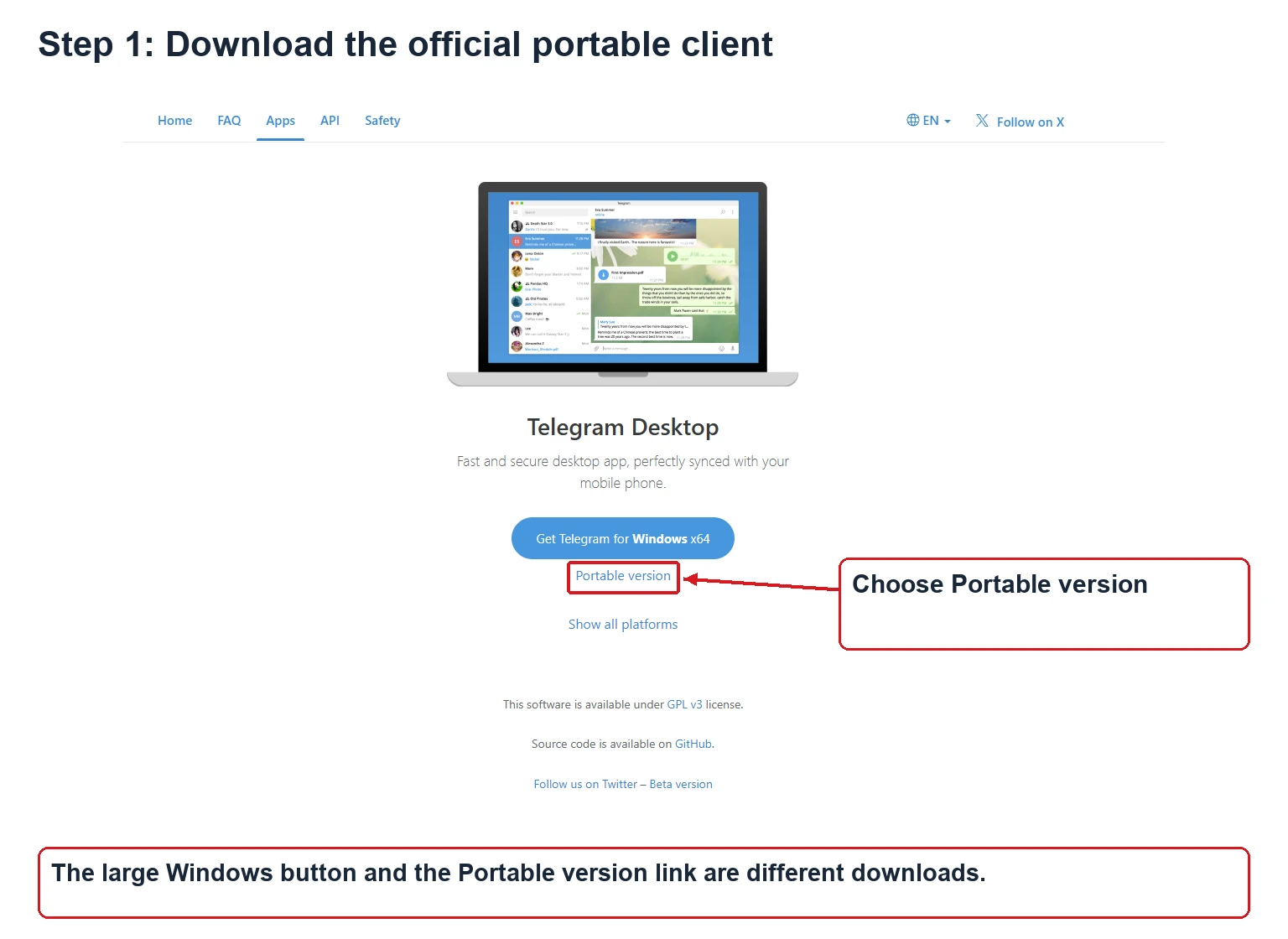
Step 1: Download the official Portable version
Open the Telegram Desktop website and find Portable version under the Windows downloads. If another operating system is shown first, inspect the options for all platforms. The regular installer and the mobile app are different downloads from the portable client used here.
Expected result: an official portable archive matching your system. Version numbers change, so do not rely on a fixed filename from an old tutorial.
Step 2: Extract the client into its own working folder
Create a writable folder, for example D:\Telegram-Work\account-01\, and fully extract the portable client. Locate Telegram.exe and keep the other files supplied with the official build. This is an example path; a D drive is not required.
Expected result: the extracted executable is visible in File Explorer, outside the archive preview. Do not launch it yet.
Step 3: Extract the account files and find the complete tdata folder
Find the directory named tdata in this account’s delivery. If the order supplies a TXT download instruction, obtain the corresponding archive first and extract it completely. Do not rename Session or JSON files to TData, or select just one internal file to copy.
Expected result: a complete tdata directory matched to the account’s supplied instructions, without mixing files from other accounts.
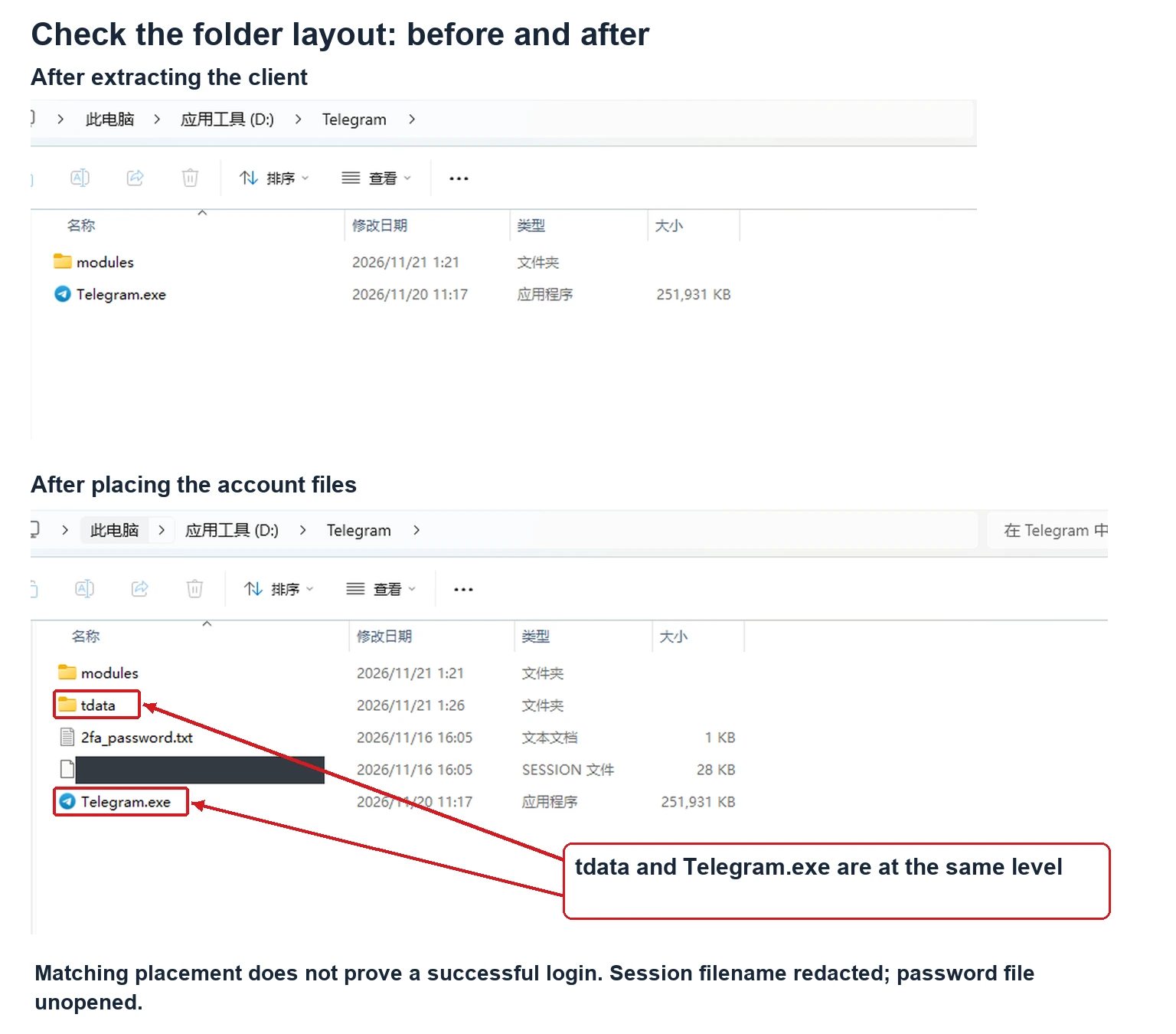
Step 4: Check the folder relative to the executable
For the portable setup with its default working directory used here, place the complete tdata directory in the corresponding client working folder, normally beside Telegram.exe. This illustrates the relationship, not a universal absolute path for every installation, operating system or custom working directory.
D:\Telegram-Work\account-01\
  Telegram.exe
  tdata\
(keep the internal files and subfolders intact)| Layout | Meaning | Check |
|---|---|---|
| Telegram.exe beside tdata | Matches this default-working-directory example | Launch this exact executable |
| account-01 / delivery-files / tdata | The data is still inside the outer delivery folder | Check which directory the client actually reads |
| account-01 / tdata / tdata | An extra nested directory | Check the archive structure rather than treating its outer container as the data folder |
Expected result: you know which executable uses which data, and the target client was stopped while placing the files. A launcher specifying another working directory needs a check of that actual location. Do not overwrite your personal account’s folder if uncertain.
Step 5: Launch Telegram.exe from this directory
Open the executable you just checked, rather than an old shortcut that may point elsewhere. Let the client read its data and connect. Observe whether it shows the account, a sign-in screen, a password prompt or a file-access error.
Expected result: a running client with an identifiable result. If the account does not open, do not repeatedly rename files, replace internals or guess passwords. Follow the relevant symptom below.
Step 6: Verify the account and current session
If an account opens, check its expected profile and number in settings, then review its devices. Seeing a chat list alone does not establish that it is the intended account or that future devices will receive verification codes.
Expected result: the intended account is open and future sign-in requirements are understood. For unfamiliar devices, follow Telegram’s current prompts. Do not turn a temporary restriction on ending another session into a fixed waiting-time promise for every account.
Still seeing a QR code, or being asked for a password?
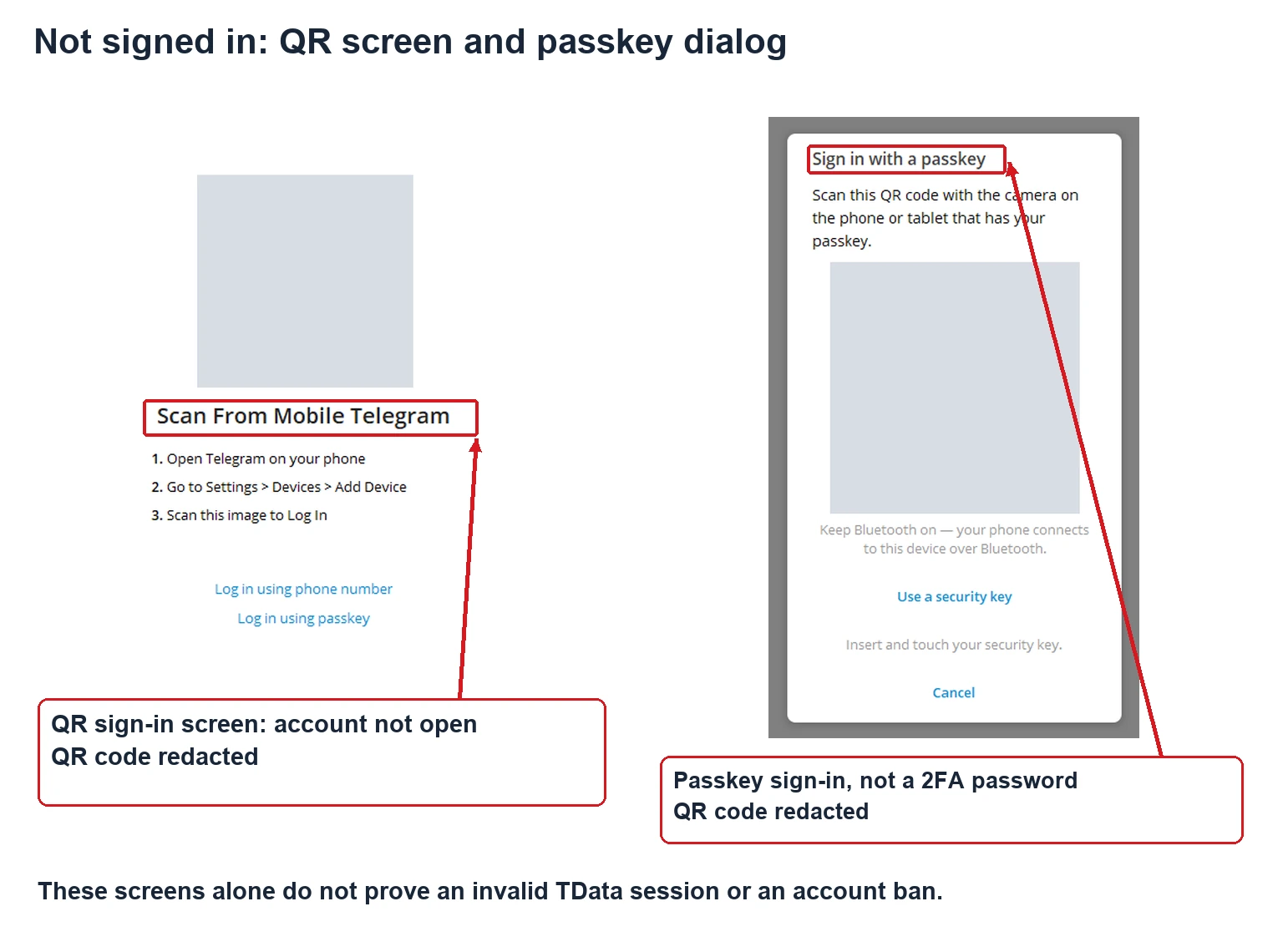
Identify the prompt before diagnosing the cause. A QR or phone-number screen means the client did not directly open the expected session. That screen alone cannot establish a wrong path, missing data, an ended session or a restricted account.
The screenshots below document incomplete sign-in. Scan From Mobile Telegram is the QR login screen; Sign in with a passkey belongs to passkey authentication, not a local unlock or a 2FA password field. Both QR codes are redacted. These screens alone do not establish correct folder placement, session validity or an account restriction.
| What you see | Check first | Next action |
|---|---|---|
| QR or phone-number sign-in screen | Executable path, working directory, nesting and file completeness | Quit fully and check the working copy; if access is still unavailable, ask the supplier to clarify session status |
| Local passcode prompt | Whether the screen explicitly requests a local unlock passcode | Find that passcode, rather than mixing it with a login code or 2FA password |
| Two-step verification password requested during sign-in | Whether a new account-verification flow is being performed | Use supplied account information and official recovery options; do not assume a particular password filename |
| A different account opens | Old shortcuts, another executable or the wrong delivered data | Stop and match the executable path to the account files |
| File or folder cannot be written | Running inside a ZIP, folder permissions or a client still holding the files | Use a complete copy in your own writable directory; do not default to elevation or disabling protection |
| Client does not start or closes immediately | Official source, system architecture, complete extraction and system security messages | Preserve the full error and check the official client; an exit alone does not diagnose account status |
| Sign in with a passkey dialog | This is passkey authentication, not a 2FA password field | Use this flow only with an available passkey for the account. For TData troubleshooting, cancel and check the directory and session; the dialog does not establish successful session restoration |
Account two-step verification uses an additional password, while an application’s local lock has its own purpose; see Telegram’s security guidance. If a new sign-in requires a code, use the channel offered by the current client. A service message on an existing device and a mobile SMS are different delivery channels.
Copying a folder does not revive an ended session. A new sign-in requires Telegram’s applicable verification conditions. If directory checks do not resolve access, retain the order number, client version, attempt time and a redacted error screenshot. Contact support or tickets and read the account support policy.
Can you follow this on a phone or Mac?
TData is not a direct-import package for Telegram’s Android or iPhone apps. If a delivery requires restoring a Windows desktop session before linking a phone, that computer step is still necessary. Mobile sign-in follows the official app’s verification requirements.
macOS, Linux and different installation channels cannot simply reuse this Windows directory example. Confirm the compatibility of the actual client and supplied data. If you already have a working account, official device-login options may be sufficient; changing devices does not itself require buying another account.
TData login FAQ
Is TData the account password?
No. It is Telegram Desktop’s local data directory and may hold session authorization data for compatible software. It is not a password string to enter.
Does a QR screen mean the account is banned?
No such conclusion follows from the screen alone. Check the working directory, executable, file completeness and session status, and use explicit platform messages to assess restrictions.
Which password does a password screen need?
First distinguish a local unlock prompt from account two-step verification. Their purposes differ, and delivered filenames are not standardized.
Can I rename Session to TData?
Renaming does not convert formats. Session depends on its originating software; TData is a desktop data directory. Check compatibility. This guide does not require online conversion.
Should I replace my existing tdata folder?
Do not overwrite your everyday account’s directory with received files. Use a separate working folder to protect your own local data and avoid opening the wrong account.
Can I open TData with only a phone?
It is not a mobile direct-import package. If the product requires a Windows first step and subsequent phone linking, confirm access to that computer and the required verification information.
Will copying files again restore an expired session?
It cannot restore authorization that has ended. Directory checks address local placement, not the verification required for a new sign-in.
Does TData guarantee recovery of all chat history?
No. It is not a universal chat export backup. Session validity, access to cloud content and locally cached content are different issues.
Choose by the supplied delivery format
For portable TData delivery, review the Telegram Desktop portable TData account. If you need to compare supplied Session and 2FA information too, inspect the US account with TData, Session and 2FA information. Choose by delivery requirements and software compatibility, not an unsupported reliability promise attached to a format name.
Browse the Telegram account category for other options. Prices, stock and current purchasability are checked on the product page and at checkout. Unconfirmed stock is not described here as available inventory.