

Before buying a Telegram account, match the delivery format to your device and confirm how future sign-ins will work. Country labels, account age and a low price do not answer those questions. This guide uses current Maihao AI listings to compare use cases, specifications, prices, ordering and delivery checks.
If you already have a working account for conversations, channels or a Premium subscription, first decide whether you need another account. For important long-term work, prioritize continued control of the linked number and recovery options.
Account, verification service or Premium gift link?
A ready-to-use account is an existing Telegram account. Delivery may include TData, Session, JSON or a number with a code-access link. Terms such as “direct login” and “protocol account” are not uniform specifications across sellers. Read the actual file and sign-in requirements.
A number and first-use OTP service addresses a registration or verification step. Its description requires human assistance and excludes long-term ownership of the number. It should not be presented as a standard ready-to-use account.
A three-month Premium gift link supplies a membership link for an eligible existing account, not a new Telegram account. Check that product’s redemption conditions and post-delivery support limits separately.
Choose specifications for your actual use case
| Use case | Common problem | Check first |
|---|---|---|
| Following channels and everyday conversations | Buying a desktop-first format when you only have a phone | Whether first sign-in works on mobile and where the code comes from |
| Separate work and personal communication | Mixed identities and unclear handover | Need for a separate account, device management and number control |
| Existing customer enquiries and support | Losing access after changing phones | Future verification, recovery and the responsible operator |
| Managing a group or publishing a channel | Assuming account access includes administrator permissions | Account access and group/channel permissions separately |
| Managing your own account in compatible software | The supplied Session or JSON does not match your tool | Actual files, supported software and required configuration |
| Premium features on an existing account | Buying another account unnecessarily | Subscription term, redemption eligibility and destination account |
These uses do not require buying an account in every case. Account access does not bring customers, members or marketing results by itself. Telegram explains that unwanted contact can lead to reports and restrictions in its Spam FAQ.
What is TData? A Telegram Desktop data folder
TData usually means the local tdata folder used by Telegram Desktop. It stores desktop account authorization data, settings and other local data. A listing that supplies TData normally provides an archive of this folder for a compatible Telegram Desktop installation to read an existing session. It is not a phone number, SMS code or a string to paste into a password field. The directory and encrypted-storage mechanisms are implemented in Telegram Desktop’s official source.
A phone number identifies the account; a code verifies a sign-in; TData holds an existing desktop client’s local sign-in state. Restoring it depends on complete data, a valid session and compatible software. Receiving the folder does not guarantee verification-free access, ownership of a SIM or permanent access to future codes.
For a Windows portable setup, the folder relationship can look like this. Keep the complete tdata directory rather than selecting one internal file, and avoid accidentally nesting it as tdata/tdata:
TelegramPortable/
  Telegram.exe
  tdata/
    (keep the supplied account data intact)
This illustrates a Windows portable layout, not a universal path for every operating system, installation or client. Obtain the client from the Telegram Desktop website and follow the selected product’s requirements.
- Quit the target desktop client. Use a separate portable directory for these account files, keeping your own active account’s directory intact.
- Extract and check the complete folder. If the product requires Windows Portable, place its supplied
tdatain the working directory specified by that product, with the correct folder nesting. - Open the client and check the result. Confirm the expected account. If a sign-in screen, local unlock password or additional verification appears, check the instructions and supplied information instead of repeatedly replacing files or guessing passwords.
- TData versus Session: TData is Telegram Desktop’s data directory. A Session file usually stores a session for a particular API client or tool. Renaming a file does not make the formats interchangeable; compatibility depends on the software that created it.
- Local passcode versus 2FA: A local passcode unlocks the client’s stored data. Telegram’s two-step verification password serves the relevant sign-in checks. They have different purposes.
- Phone-only use: A supplied TData folder is not a direct-import package for Telegram’s Android or iPhone apps. A product that requires Windows session restoration before linking a phone still requires that computer step.
Keep TData private as sensitive account-access material. Do not post it publicly or upload it to untrusted conversion services. It is not a universal export backup of all chat history or proof that the account will remain unrestricted.
Understand region, age, TData, Session and 2FA
The registered number’s country and listed age are product attributes. A US +1 number does not prove the current operator is in the United States or provide access to US customers. An age requirement can guide selection, but it does not establish permanent reliability or immunity from restrictions.
| Listing term | What to confirm | Do not assume |
|---|---|---|
| TData / Portable | Supported Telegram Desktop setup and any Windows-first requirement | That a mobile app imports TData directly or every client is compatible |
| Session + JSON | The actual session file, JSON fields and matching software | That JSON alone is a complete account or works in every tool |
| Number + code-access link | What verification the link supplies and future availability | Official developer API access or permanent access to verification codes |
| 2FA enabled | Whether the needed two-step password information and recovery access are included | That every recovery credential is supplied |
Telegram two-step verification uses an additional password; it should not be confused with a generic TOTP code-generator workflow. Follow Telegram’s security guidance and your current client. Treat session files as sensitive access material and keep them away from public chats or untrusted conversion services.
Compare current Maihao AI Telegram listings
| Product | Reference price / account | Listed specification | Check before ordering |
|---|---|---|---|
| MIX-number portable TData | CNY 5.40 | MIX number; TData archive | Desktop compatibility; 2FA information is not separately specified |
| US +1 multi-format account | CNY 7.00 | TDATA, SESSION and JSON; 2FA information supplied in files | Compatibility with your chosen format and software |
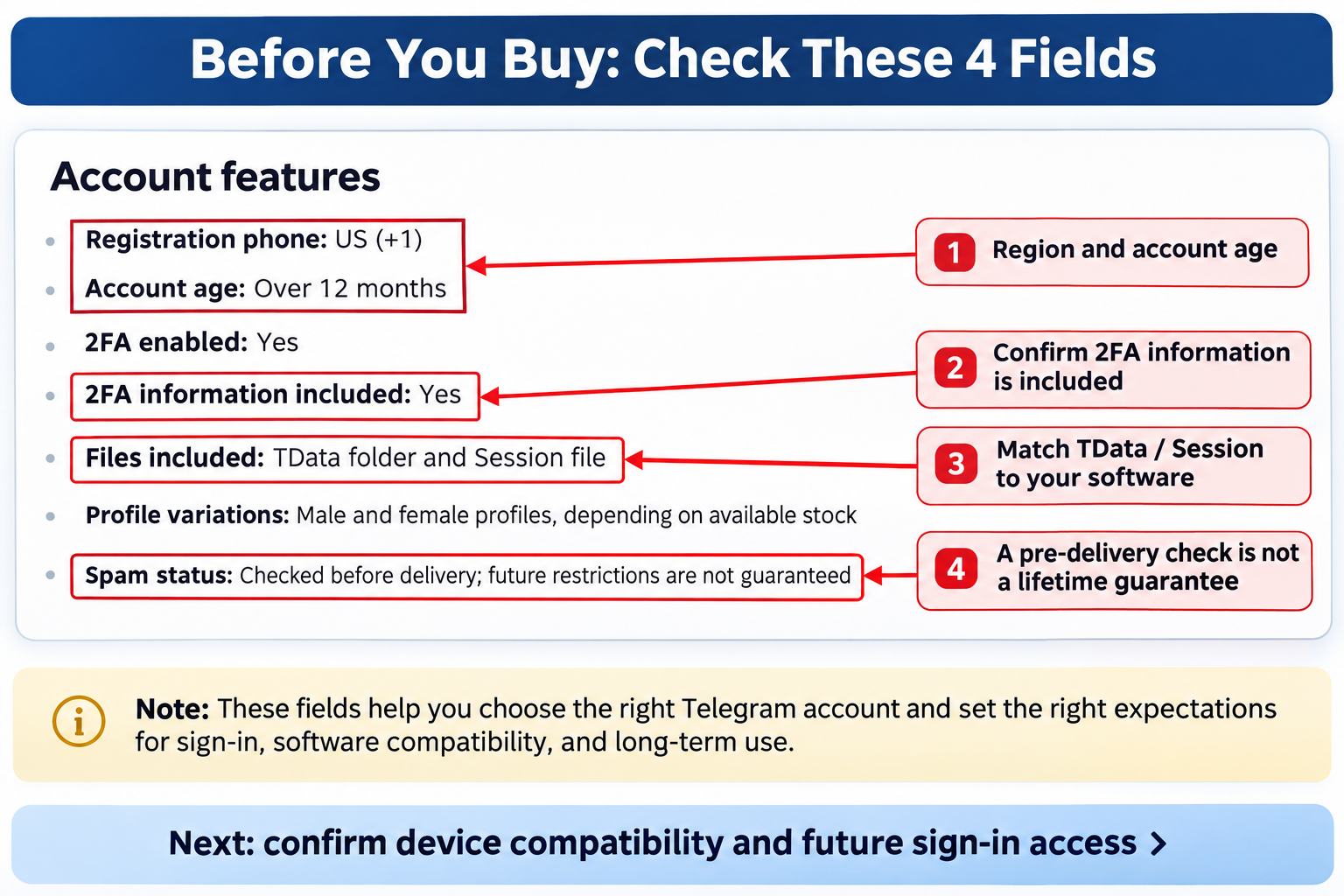
| US +1, over 12 months | CNY 7.80 | TData + Session; 2FA enabled and information included | Listed age, supplied files and future access conditions |
| Chile +56 multi-format | CNY 5.40 | TDATA, SESSION and JSON; 2FA enabled | Availability of needed 2FA information and compatible software |
| Chile +56 code-access link | CNY 7.00 | Number with verification-code link; mobile and computer use described | Your first sign-in route and future verification |
| US account aged since 2024 | CNY 42.00 | Portable TDATA; Windows session loading comes first | Access to a Windows computer, mobile linking and delivery review |
Prices were checked on November 16, 2026. One unit here means one account. Availability, quantity limits and the final amount are checked at checkout. USD amounts are reference conversions; account age, file count and subscription months are not purchase quantities.
Compare region, age, files, verification information and support on the same basis before comparing price. The explicitly over-12-month account is not the most expensive example above, so price alone should not be used to infer age or protection. Browse the Telegram account category for current options.
Six checks before placing an order
- Identify your device. Confirm mobile first sign-in if you only have a phone. Prepare Windows if the selected portable account requires it. Download clients through Telegram’s official apps page.
- Specify the requirement. Record region, age, delivery format and account quantity. Avoid paying more for an undefined promise of “stability”.
- Confirm future access. Ask who controls the number, where codes arrive, what a device change requires, and which 2FA or recovery information is supplied.
- Read the support terms. Check the product and order promises alongside the account support policy. Clarify missing conditions before paying.
- Review checkout. Confirm the product, units, currency, fees, order-lookup method and final charge. Payment completion is not proof that delivery is complete.
- Keep the order and delivery records. Follow the order’s processing status. Signed-in purchases use My orders; guest purchases use Guest order lookup. Start acceptance checks promptly.
This guide compares public listing specifications. It does not present a completed purchase or an account sign-in test. Product illustrations cannot replace checks of the account actually delivered for your order.
Check the delivered files and follow the right sign-in route
For example, the US over-12-month listing describes a TXT file containing Google Drive links. Each account has a separate ZIP with TData, Session and 2FA information. That is this product’s delivery route, not a universal format for every Telegram listing.
- Open the order’s TXT file, check the download source and corresponding account information, and preserve the original delivery record.
- Download and extract the relevant ZIP. Compare the promised file types, account count and 2FA information. Do not run untrusted executables.
- Use an official client and follow that product’s session-loading requirements. The separate US-since-2024 listing explicitly starts with Windows Telegram Portable. Keep other accounts’ session directories intact.
- If linking a phone, follow the current client’s verification prompt. The US-since-2024 example receives the mobile code in the signed-in desktop session; keep that session available until linking is complete.
- Verify the expected account and necessary basic functions. Record the first attempt. For wrong details, unexpected verification or inaccessible accounts, keep evidence and report promptly instead of repeatedly guessing.
| Check | Passing condition | Keep if there is a problem |
|---|---|---|
| Product and quantity | Delivered region, specification and units match the order | Order number, product name and delivery item index |
| Files and sign-in route | Promised format is present and matches your supported device | Redacted file structure, client and full error |
| 2FA and recovery conditions | Promised information works; omitted conditions are clarified | Missing fields compared with the listing |
| Actual access | Expected account opens and necessary basic use works | First attempt result and time |
| Sessions and future access | Existing devices, future verification and number control are understood | Specific questions that support still needs to answer |
A successful first sign-in does not establish permanent control. Telegram’s login guidance warns that codes received in an existing session do not replace continued control of the linked number. Handle security settings according to platform prompts and product conditions. Investigate unknown or unmanageable sessions rather than declaring an ownership transfer complete.
Support deadlines: report first, then supplement evidence
The current Maihao AI account support policy sets a general 24-hour window starting from the earlier of delivery and first sign-in. An explicit product or order promise still applies where different protection was agreed. First sign-in does not necessarily start a fresh 24 hours.
First-sign-in or delivery problems on accounts without email, and phone-verification issues on other accounts, have a special reporting deadline of 30 minutes after purchase. Apply the rule to the actual delivery and problem. Send the order number, problem type and redacted screenshot through support or tickets first, retain the submission time, and supplement the evidence. Thirty minutes is a reporting deadline, not a support-response promise.
Report incorrect initial details, disabled accounts on delivery or specification mismatches within the applicable window. Improper changes, rule violations and late reports are handled under the policy. This guide promises neither unconditional refunds nor lifetime replacements, and account terms should not be applied automatically to Premium gift links.
Telegram account buying FAQ
Can I buy a TData account if I only have a phone?
Do not rely on “mobile supported” alone. If Windows TData loading must happen before a phone receives a code, a phone-only setup cannot complete that route. Confirm a product that explicitly supports your first sign-in method.
Does “API login” mean Telegram developer API access?
Not necessarily. The Chile +56 example describes a number with a link for viewing a verification code. Check the supplied steps rather than assuming developer API permissions.
Are aged accounts always more reliable?
No such guarantee follows from age alone. Check the actual state, history and intended use; registration year is not proof of immunity from restrictions.
Does buying an account include a SIM and long-term code access?
Not by default. Account information, a single code and control of the number are different things. Long-term verification or number ownership needs an explicit promise.
Does “2FA enabled” include the password and recovery email?
That label alone is insufficient. Confirm the two-step information supplied and whether a recovery email is accessible. Session files do not replace every recovery condition.
Does every order deliver automatically and work immediately?
No. Even an automatically fulfilled listing can have processing, delivery review or verification requirements. The number-and-OTP example expressly requires human assistance. Follow the actual order status.
Can a purchased account send unsolicited messages without restrictions?
Buying an account provides no such permission or guarantee. Telegram acts on unwanted-message reports, and a pre-delivery check does not guarantee future status.
Do I need another account just to get Premium?
Usually that goal does not require buying a separate account. Compare membership options for your existing account, including redemption eligibility, term and support limits.