Muse and Grok Bot can both keep working in the cloud. Choose by the job, your existing subscriptions and the permissions you are prepared to grant. Muse is worth checking for a free starting point and a single-assistant workflow; Grok Bot is worth checking for named specialist Bots, reusable workflows and existing Cursor access. Muse also supports small-business tools, so the choice is more nuanced than “personal versus professional.”
This comparison uses official documentation and original reviews checked on November 3, 2026. The exercises below are evaluation workflows, not results from an original maihao.ai head-to-head test.
Quick verdict: choose by the job, access and existing plan
| Your situation | Check first | Why it matters |
|---|---|---|
| You want to organize documents or try a personal assistant without committing | Whether Muse offers free access to your account | Finish a small task before paying for more capacity |
| You already pay for Cursor, SuperGrok or an eligible X plan | Your existing Grok Bot entitlement and linking options | Some legacy plans include or can unlock access |
| You want separate research, content and operations roles | Grok Bot’s named Bots, skills and routines | Roles organize work; they do not create isolated computers |
| You run a small business | Required connectors, approvals and editable deliverables in both products | Muse has business connectors, too |
An accessible product that handles your sources correctly is more useful than a higher score on an unrelated task. Check eligibility, test the work, then decide whether an upgrade solves a demonstrated limit.
What exactly are Muse and Grok Bot?
Muse is Meta’s personal AI agent application. Grok Bot is a separate agent application in the xAI product ecosystem, whose documentation is currently branded SpaceXSI. Grok Bot uses the Cursor account system. Ordinary Grok chat, @grok on X, the Grok model API and third-party Telegram or Discord bots are separate things.
Muse is an application rather than a synonym for its underlying models. Our guides to what Meta Muse can do and Muse models versus the app explain that distinction. A model benchmark does not demonstrate that a product will handle your permissions or complete long-running work correctly.
One account, multiple Bots, one shared computer
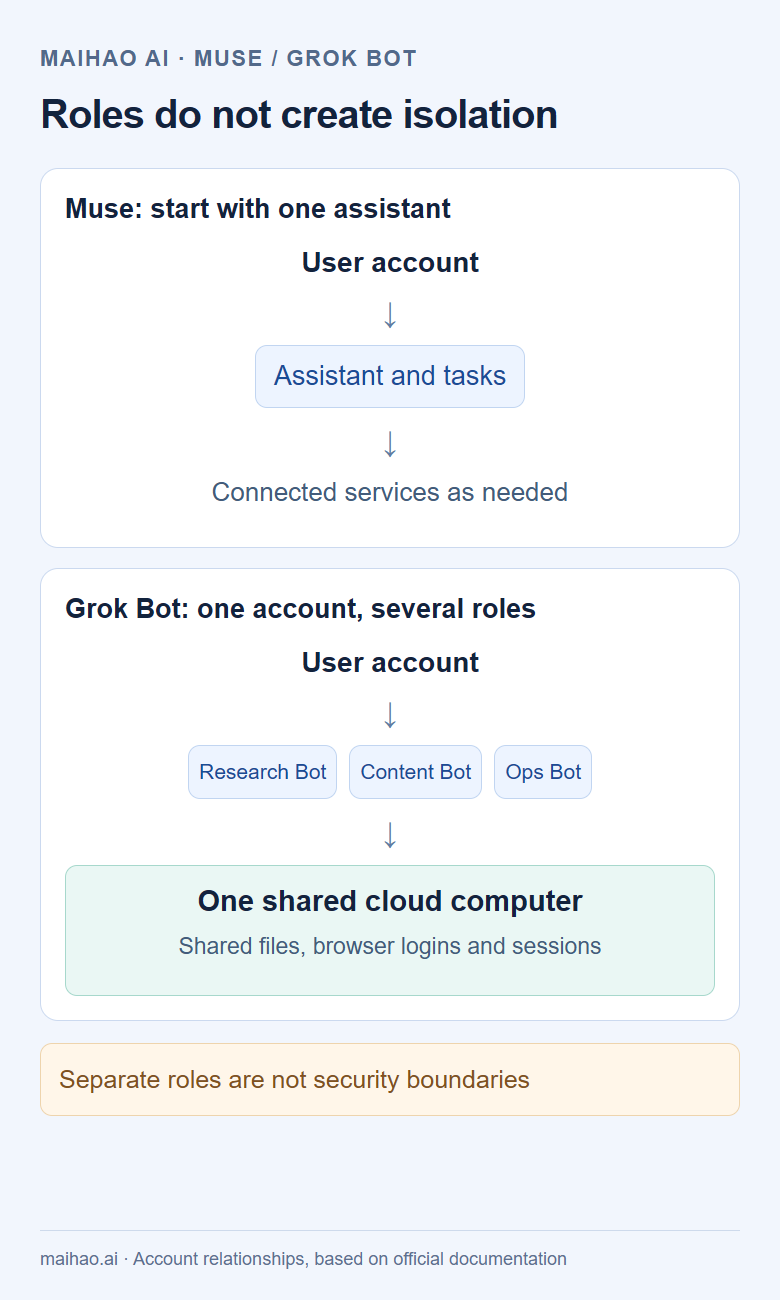
The official computer documentation says the Bots in one account share a persistent cloud computer, files and browser sessions, while working on separate screens. A research Bot and an operations Bot can have different responsibilities without independent credentials or a separate security boundary.
Features compared: tasks, memory, connectors and automation
| Capability | Muse | Grok Bot |
|---|---|---|
| Ongoing work | Cloud execution and scheduled tasks | Cloud computer and routines that can run while your laptop is closed |
| Organization | An assistant, conversations, connected services and tasks | Multiple named Bots with focused responsibilities |
| Business tools | Announced Shopify, Canva, Slack and Stripe connectors; custom connectors supported | Connect apps, browser sessions and reusable skills |
| Automation | Confirmed reminders, scheduled work and proactive connector updates | Scheduled or supported event-triggered routines |
| Controls | Settings → Permissions, with connector and task controls | Auto Review, Custom Rules and action-specific approvals |
| Continuing context | Personal context used in conversations and tasks | Explicit Bot responsibilities, lasting preferences and a shared private skills library |
Meta’s small-business announcement makes “Muse is only for personal errands” an unhelpful shortcut. A connector being listed does not prove your organization permits it or every action is available.
Separate an automation’s method from its trigger. A Grok Bot skill describes how to work; a routine determines when a Bot runs it. Confirm inputs and approval boundaries in either product. An unverified feature should not be labeled unsupported.
What hands-on reviews and benchmarks actually show
Named practitioner reviews
ChatPRD creator and How I AI host Claire Vo compared four agents across nine tasks in her October 28 demonstration. She reported nine tasks completed by Grok Bot and seven by Muse, while explaining that Muse lacked access to some work systems, including GitHub. This is workflow evidence with unequal permissions, not a controlled universal verdict. The episode disclosed WorkOS and Firecrawl sponsorship.
David Pawlan’s Assistant Benchmark comparison uses real accounts and published scoring dimensions. Its current overall scores are Muse 9.3/10 and Grok Bot 8.8/10, with eight commonly scored dimensions. These are reviewer scores, not the percentage of tasks a typical user will finish.
Read each result on its own terms
| Original evaluation | Muse | Grok Bot | Scope and limitation |
|---|---|---|---|
| Claire Vo, October 28, nine-task demonstration | 7/9 completed | 9/9 completed | One practitioner; some work-system permissions differed |
| Assistant Benchmark, November 3 snapshot | 9.3/10 | 8.8/10 | Personal dimension-based scoring; observations have different dates |
| micro1 PersonalAgentBench, 20 questions per assistant | 55% task completion; 55% trusted completion | 65% task completion; 65% trusted completion | Small Google Workspace-heavy sample; account histories and prompts differed |
| MatrAIx PersonalAgentEval, October 14 protocol | 28.9% Resolved | 50.0% Resolved | Simulated users, synthetic accounts and the publisher’s 152-task protocol |
The micro1 report scores the first eligible run per question, retaining valid failures. These results correspond to 11 of 20 versus 13 of 20, a two-question difference. Account history, prompts and setup were not identical, so they describe that sample rather than your account’s future success probability.
MatrAIx’s evaluation and methodology use a simulated-user environment with multi-session work. Its Resolved metric is not interchangeable with micro1’s trusted completion measure.
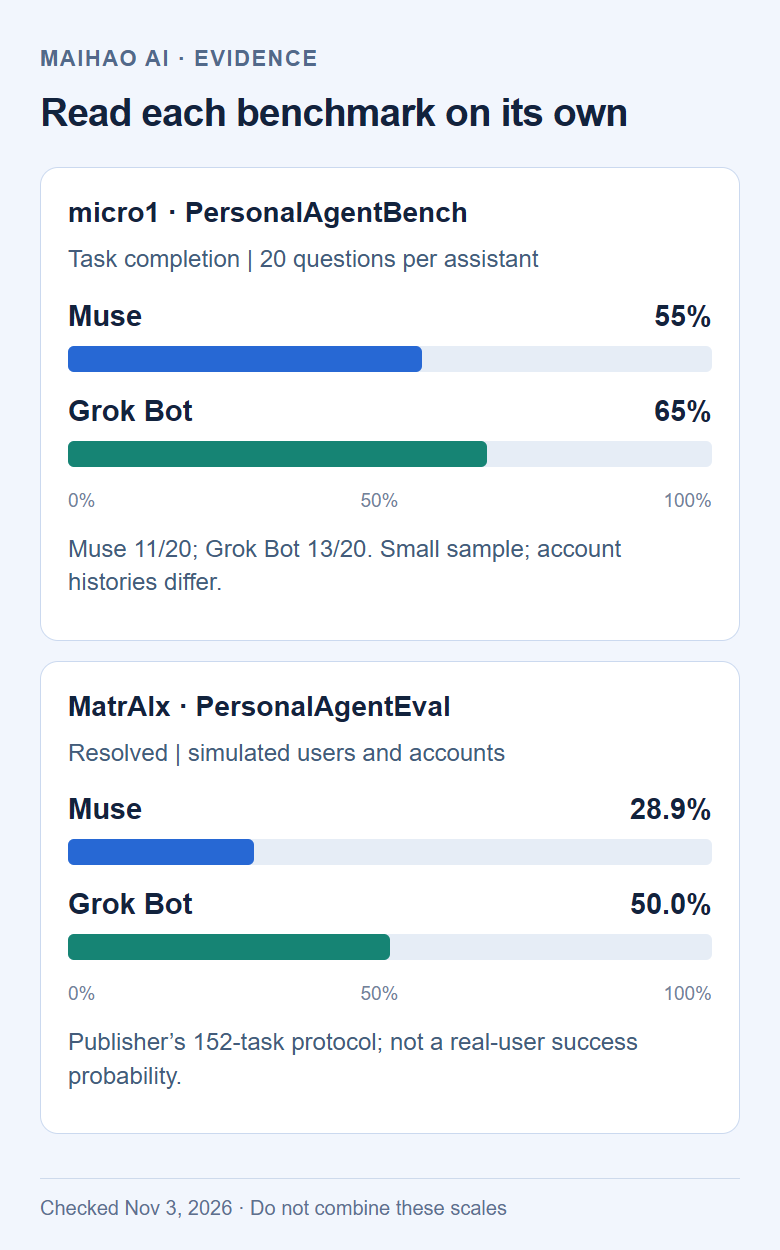
Do not average the rows into a master score. Claire’s 93% composite rating is not a 93% task completion rate. Use reviews to identify relevant tasks, then check the outputs against your own source material.
Pricing and usage: new plans, existing access and extra costs
These are checked US-dollar monthly list prices for individual plans. Local offers, checkout taxes and store billing can differ.
| Product or plan | Monthly list price | Important qualification |
|---|---|---|
| Muse free access | $0 | Limited usage; availability and benefits vary by account and region |
| Muse Power | $20 | 500M Muse tokens per week |
| Muse Maximum | $100 | 3B Muse tokens per week |
| The X Subscription Plus | $8 | Does not include Grok Bot |
| The X Subscription Premium | $30 | Includes Bot using shared weekly capacity |
| The X Subscription Super / Ultra | $100 / $200 | Includes Bot with higher shared usage tiers |
Check Meta’s subscription help and The X Subscription pricing before subscribing. Token accounting differs; raw allowances do not establish a reliable cost-per-task comparison.
Already paying? Check before buying again
The Grok Bot setup guide lists eligible legacy Cursor plans and linking options for certain SuperGrok and X Premium+ subscriptions. New-plan prices and legacy entitlements are separate rules. Sign in to the account that owns the subscription, then inspect Settings → Usage & Billing or the linking screen.
The new X subscription shares a weekly pool across relevant Grok, Cursor and Bot usage; these are not three additive allowances. Inspect extra usage, automatic top-ups and spending caps. Read trial and renewal terms for your purchase channel rather than assuming every trial behaves identically.
If you choose the optional Grok Premium CDK offered by this site, first confirm that your own US-region account displays the required half-price eligibility and has no existing membership to overwrite. It funds one month on your account. The 30-day subscription-loss warranty does not cover account bans. Linked Bot access depends on the account’s actual entitlement and does not establish regional eligibility. Existing eligible subscribers do not need this purchase to follow the guide.
Availability and devices: check each entry point
Muse provides web, Mac and mobile entry points. Grok Bot documentation lists macOS, Windows, Linux, iOS and Android. A download does not establish that every feature is enabled. See our Muse downloads and devices guide for official paths.
Meta has confirmed the US and Canada, Japan’s October 23 launch and Singapore’s October 27 launch. These are confirmed examples, not a permanent exhaustive country list. Muse subscriptions require presence in a supported country and satisfaction of age and account conditions.
If you are outside a supported region
- Open the official entry with your account. Distinguish a region-unavailable message from a waitlist, verification request or network error.
- For a region restriction, check official availability updates. If actually in a supported country, contact support with the redacted message and your location.
- Diagnose connectivity separately from eligibility. A remote browser changes where browsing executes; it does not establish that the user qualifies. Buying an account or subscription does not grant regional eligibility. Our Muse sign-up and availability guide explains the entry points and messages.
- If trying Grok Bot instead, check its application and your account’s access. Do not infer the whole app’s availability from an X-only feature.
The @bot tagging rules separately exclude X accounts based in Australia, the UK, the EU, Iceland, Liechtenstein and Norway. Tagging uses the country X records; current location or a VPN does not change that check. If @bot does not reply, open the standalone app to check whether a task arrived.
Three workflows that make the choice clearer
Use the same redacted input in both products. In Muse, start a new conversation and attach the material. In Grok Bot, use the intended Bot’s conversation; create a focused role through sidebar + → Create a Bot if needed. These procedures define a test, not a claimed result.
1. Turn meeting notes into an auditable summary
Prepare numbered, anonymized notes. Ask for decisions, owners, due dates, open questions and a source location for every entry.
Use the anonymized meeting notes I uploaded to list decisions, owners,
due dates and open questions. Cite the source location for each item.
Mark missing details as "not provided."
Return the result in this conversation only.
Do not edit the source, send messages or create calendar events.
Check at least three entries, including one with a missing owner or deadline. The expected result is a traceable summary without invented details or external changes. If a claim lacks support, ask for a correction anchored to the relevant passage. A polished table alone is insufficient.
2. Draft a small business’s week of content
Supply a fictional product brief, audience, channel, budget and prohibited claims. Keep advertising accounts disconnected initially.
Ask for seven editable drafts with copy, channel, assets and approval needs. Check prices and entitlements against the input. Revise one day’s post to test whether the format remains useful.
Only connect store data if needed and permitted. An administrator approval problem is an access issue, not proof of weak model reasoning. This exercise measures constraint-following and usable output, not advertising performance.
3. Make a verified report repeat
Run a report manually and verify its numbers and links before scheduling. In Muse, request scheduled work and inspect Upcoming. In Grok Bot, ask the owning Bot for a routine and review its details; the skills and routines guide explains the controls.
Confirm the time zone, input, destination and missing-data behavior. Instruct it to report a failed source rather than silently reuse stale data. After the first scheduled time, inspect the run record and actual artifact. A saved schedule is not a completed run. If nothing happens, check paused status, approvals, access and usage before resubmitting.
Approvals, data and how to stop a workflow
For Muse, inspect Settings → Permissions, then Activity and scheduled work. For Grok Bot, inspect Auto Review, Custom Rules and the actual task or routine state. This capture shows official documentation, not a signed-in account or a successful private task.
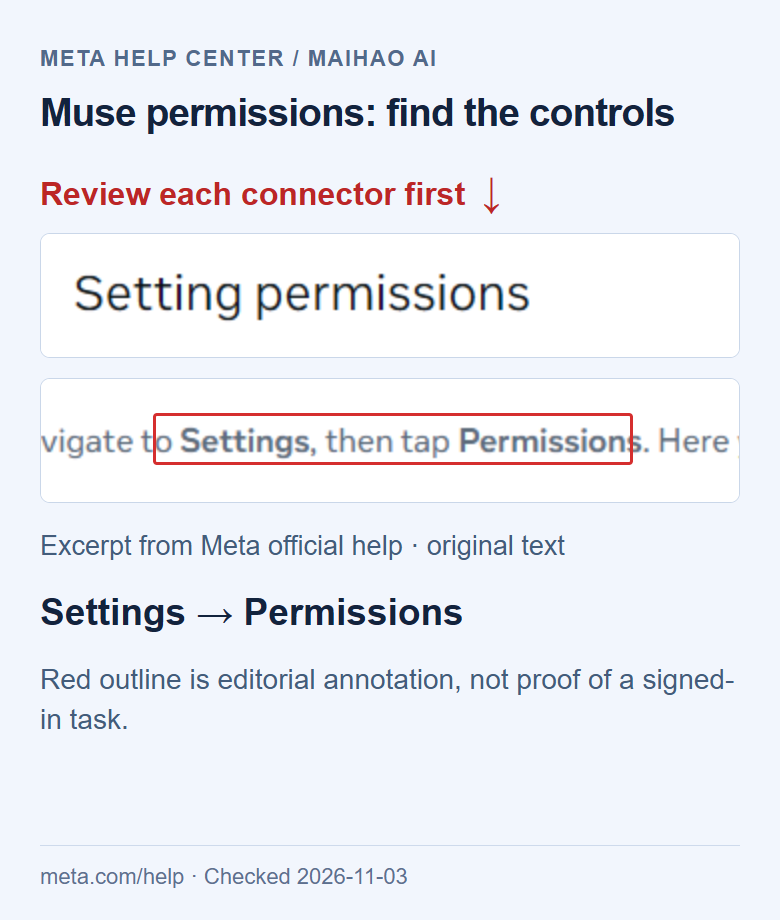
Start with an explicit draft-only boundary. Before sending, publishing or spending, check the destination, account, recipient or amount. Follow Meta’s permission controls and Grok Bot’s approval rules.
For email from a Bot’s own address, a chat-requested send can proceed when Auto Review permits it. Routine-triggered or other background email waits as a draft until Send. “Every email always needs a separate Send click” overstates the rule.
To stop a workflow, pause future runs, stop current work, revoke unnecessary connectors and inspect the external service for changes already made. Approval does not undo a completed action. Shared Bots do not replace customer-data separation. Advertising use, retention and model-training controls also require separate inspection.
A five-step first-task check
- Access: Confirm the signed-in account has the intended entitlement.
- Connections: Confirm the task can read the correct material and reports missing access.
- Grounding: Check passages, numbers and links; missing information should stay missing.
- Outcome: Distinguish waiting, failure, partial completion and success. Verify external writes in the destination.
- Usage and repetition: Check consumption, additional charges, time zone and pause controls.
A summary without the promised attachment is partial completion. An expired connector needs restored authorization and a targeted retry, not duplicate submission of the entire workflow.
Muse vs Grok Bot FAQ
Is Grok Bot the same app as Grok?
No. Ordinary chat and the standalone Bot have different entry points, environments and access requirements.
Is Muse only for personal errands?
No. Meta has announced business connectors and small-business workflows. Judge the actual task and permissions.
Does Grok Plus include Grok Bot?
The current X Subscription Plus tier does not. Premium, Super and Ultra do; check legacy access separately.
Do existing Cursor or SuperGrok subscribers need to pay again?
Not necessarily. Check the owning account and linking flow before buying another plan.
Does each Grok Bot get a separate computer?
Bots in one account share the computer, files and browser sessions. Separate roles do not establish isolation.
Can either agent work while my laptop is closed?
Both describe cloud-based ongoing work. Approvals, usage, authorization and failures can still interrupt it.
Will a VPN or purchased account fix a region restriction?
It cannot guarantee eligibility. Muse has availability requirements; @bot separately checks the recorded X account country.
Can they send messages, publish or pay automatically?
That depends on the tool, initiating request and approval rules. Verify a draft and authorize the specific action.
Why do reviews disagree about the winner?
Tasks, permissions, dates and scoring definitions differ. Evaluate relevant workflows instead of averaging incompatible scores.
