
To use a Muse referral reward code, get one from an existing user, join Muse, and redeem it in Settings within 48 hours of joining. The officially announced reward is 1 billion Muse tokens for the inviter and 1 billion for the invited friend. The friend must onboard and redeem the code to meet these referral reward conditions.
This guide covers Muse, Meta’s personal AI agent: where to enter a reward code, whether you can redeem again, and how to handle invalid, used-up or time-limit messages. Use the official Muse entry point to open the web app or download a client. For a product introduction, see What is Muse?
Where can you get a Muse invite code?
Get it from an existing user’s invitation panel
Ask a friend who uses Muse to open their Invite panel and share the code or complete referral link. A published web screenshot shows Invite in the upper-right corner opening a panel with Copy referral link. The Japanese iPhone interface provides sharing buttons.
You can also find codes in public posts, but a code that worked when posted is not necessarily usable now. Muse’s current official redemption messages distinguish expired, used-up and disabled codes. Check the result in your own redemption form. The Muse homepage URL is not a personal referral link.
Check these three things before redeeming
- Check the product and URL, and continue on muse.ai or its official client.
- Confirm that you joined Muse within the past 48 hours and have not already redeemed a referral reward code on this account.
- Check the complete code. The inviter also receives a reward when the redemption qualifies.
Enter the code yourself inside Muse. Do not send the person sharing it your account password, email sign-in code or recovery credentials. If they ask for those details, stop and return to the official entry point.
Invite code, referral link and email sign-in code: what is the difference?
| Item | Purpose | Where to use it |
|---|---|---|
| Referral reward code | Redeems a referral reward after joining; the official published window is 48 hours after joining | The Muse redemption form |
| Referral link | A sharing link generated by the invitation panel | Keep the complete link and follow the landing page steps; clicking the link alone is not successful redemption |
| Email sign-in code | Verifies email access or completes a sign-in or other account action | Your own inbox and the corresponding official verification page; do not enter it in the reward-code form |
| Store invitation assistance service | The assistance actions promised by a seller | Read the product delivery terms; assistance actions are not confirmed Muse rewards |
Treat the reward code separately from your account’s sign-in credentials. If you have already purchased a ready-made account and need to understand its delivery format, see the purchased Muse account first-login and verification-code guide.
Where do you enter a Muse invite code?
The official announcement specifies Settings and redemption within 48 hours of joining Muse. The steps below follow published English iPhone and web interfaces.
iPhone app: Settings → Redeem referral code
- Open Muse and sign in to your own account that will receive the reward.
- Open Settings and tap Redeem referral code.
- Enter the code in the six-character form, check it, then tap Confirm.
- Look for a successful-redemption message. If you get an error, use the relevant message type below.
The Japanese iPhone interface also provides a route through Invite friends: tap 利用する (Redeem) in the upper-left corner to open the referral-code form. The sharing panel and the redemption form serve different purposes; opening the sharing panel does not claim the reward.
Web: Settings → General → redemption below Usage
- Open the official Muse website and sign in to the intended account.
- Go to Settings → General and click Redeem invite code below Usage.
- Enter the complete code in the Redeem a code form, then click Confirm.
- Look for a success confirmation. To check your balance, return to Settings → General and find Additional tokens in the Usage section.
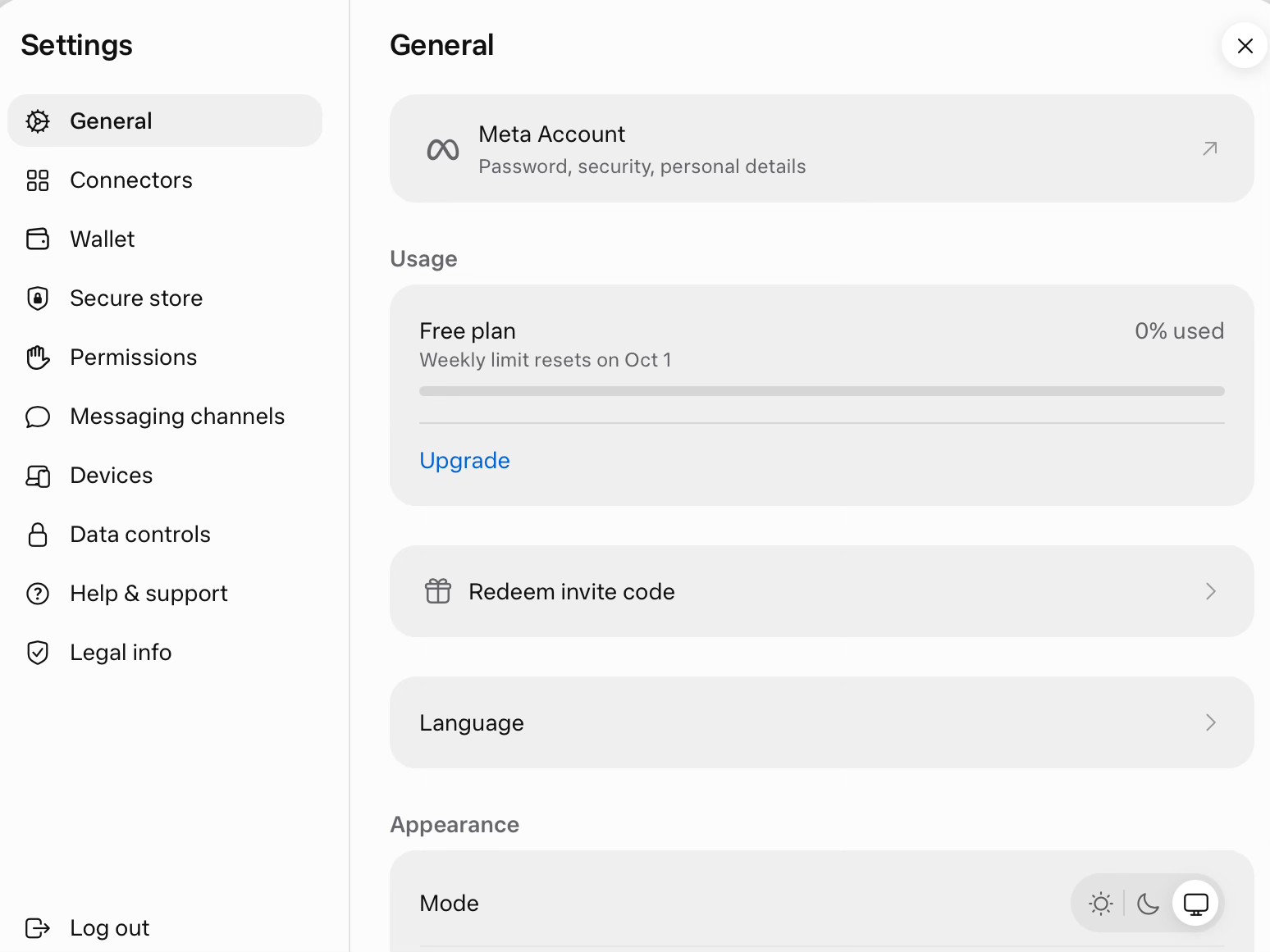
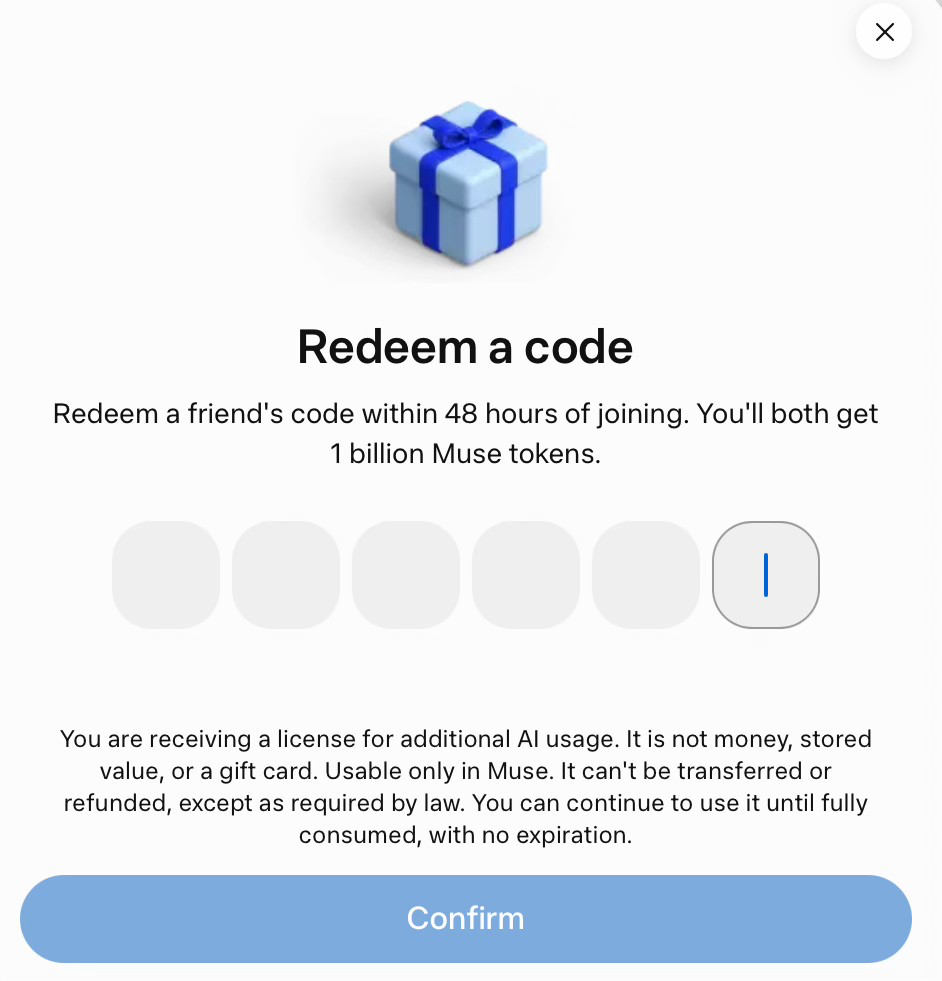
The steps above describe the illustrated English interface. The Chinese settings view checked for this guide does not show a redemption entry. That alone does not establish that the account has redeemed, missed its window or been restricted; ask official support if your menu differs.
How do you confirm that redemption succeeded?
The illustrated iPhone success screen displays “Congratulations!” and confirms successful redemption. It is an example of a completed flow, not a new redemption performed for this guide. A pending message means redemption remains unconfirmed. An existing token balance alone does not prove a new referral reward was credited.
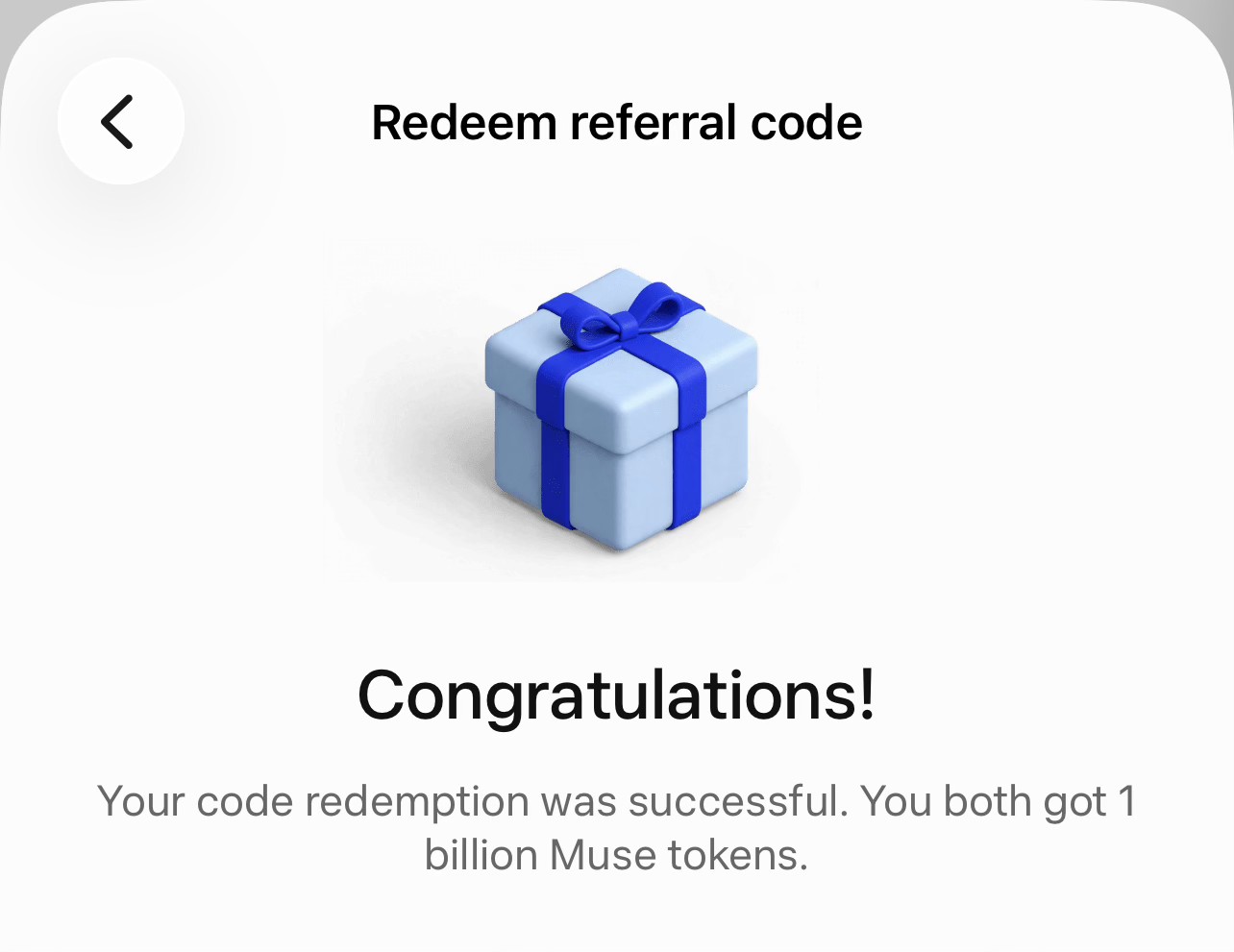
Check Additional tokens in the Usage section for the balance. If redemption remains pending, save the time, device details and the message, then use Help & support or Report an issue. The account inspected for this guide already shows 1 billion additional tokens and a no-expiry label; no code was submitted, so that balance is not proof of a new redemption.
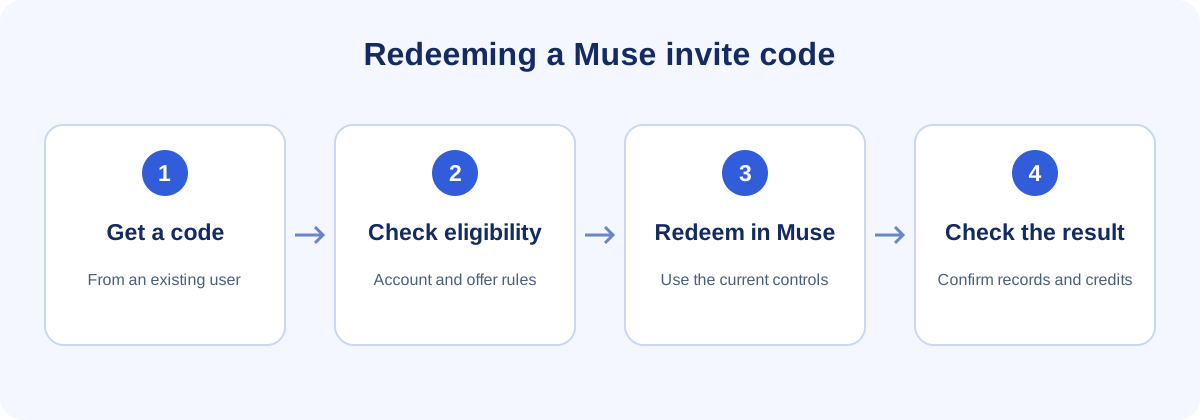
Where is your own Muse invite code, and how do you share it?
In the published web interface, Invite in the upper-right corner opens your code and sharing panel; Copy referral link copies the referral link. The Japanese iPhone invitation page offers the system share sheet, Messages, WhatsApp and Messenger.
- Share the original code or complete link from your account panel, and explain that both people receive a reward when the conditions are met.
- Remind the friend to redeem within 48 hours of joining.
- A remaining-use count is a snapshot, not a live balance when someone later views your screenshot.
- Read the exact error if the friend has a problem: a used-up code, an already-redeemed account and a closed account window need different responses.
Muse referral rewards: amount, time limit and uses
Muse’s official referral launch announcement on September 16, 2026 (UTC) stated that both people receive 1 billion tokens after the friend onboards and redeems, with up to 20 friends invited at launch. That figure belongs to the launch announcement; it does not establish an identical current allowance for every account.
| Item | Confirmed rule | Scope |
|---|---|---|
| Reward for each person | 1 billion Muse tokens for the inviter and 1 billion for the invited friend | The official referral launch announcement; this is not a cash reward |
| Qualifying action | The invited friend onboards and redeems the code | Sending an invitation or opening a link alone does not meet this condition |
| Redemption window | Within 48 hours of joining Muse, in Settings | Outside that window does not meet the published normal redemption rule |
| Repeated redemption on one account | An account that has redeemed a referral reward code receives an already redeemed message | Using a different code does not remove the account’s already-redeemed state |
| Uses per code | The launch announcement allowed up to 20 friends; the invitation panel shows remaining uses | The historical announcement figure is not a universal current limit for all accounts |
| Reward token expiry and use | The redemption terms specify no expiry until fully consumed, for use only in Muse | An additional AI-use licence, not money, stored value or a gift card; nontransferable and nonrefundable except as required by law |
| Whether codes last forever | Do not treat a code as permanent; official messages include an expired-code state | No expiry for reward tokens does not mean a code never expires |
The “35” in this store’s 35-invitation assistance service describes the number of assistance actions delivered by the seller. It is not a Muse promise of 35 confirmed qualifying rewards, and it does not guarantee 35 billion tokens. Read the product’s delivery scope and restrictions before ordering.
What should you do if a code is invalid, already redeemed or outside the time limit?
Checked on October 28, 2026, Muse’s official redemption messages and terms include the following states. Use the complete error message to decide what to do; these errors cannot all be attributed to an IP address, busy hours or account risk checks.
| Message keyword | Meaning | Next step |
|---|---|---|
| invalid | The entered code did not pass validation; this message does not specify why | Check the characters and spaces and confirm it is a Muse invite code. If it remains invalid, ask the sharer for another currently available code |
| already redeemed | This account has already redeemed a referral reward code | Check the existing balance; do not keep changing codes to claim the same reward again |
| window ended | This account’s invitation redemption window has closed | Stop retrying codes. Beyond the published 48-hour window, normal redemption is unavailable; a late claim is not guaranteed |
| expired | This code has expired | If your account is still within the window and has not redeemed, ask for another available code |
| used up | This code has no remaining uses | If the account still qualifies, use a code with remaining uses |
| turned off | This code has been disabled; the message does not state why | Ask the sharer to check. Use another available code if your account still qualifies |
| too many attempts | There have been too many submissions; wait before trying again | Pause retries. This official message gives no fixed number of minutes to wait |
| pending | Redemption is awaiting confirmation and cannot yet be treated as successful | Keep a record and check the balance. Contact official support if it remains unconfirmed |
If an “unlinked” message prevents you from accessing the account, that is separate from the redemption-form messages above. Follow the Muse unlinked-account appeal steps for the access issue. Hide your email address, account identifiers and private information before sharing screenshots.
Muse invite code FAQ
Can I enter a Muse invite code after joining?
Yes. The official announcement allows you to redeem a referral reward code in Settings within 48 hours of joining Muse. This is the reward step after joining. If you are still on an invitation-access or waitlist screen, complete that screen’s requirements first; the reward window itself does not establish access eligibility.
Can several people use one code? Can one account claim again?
Several people using one code is different from one account claiming repeatedly. The launch announcement allowed invitations to up to 20 friends, so one person’s redemption does not necessarily exhaust the entire code. Check its current remaining uses. An account that has already redeemed a referral reward code cannot claim the same reward again; the corresponding official message uses already redeemed.
Are publicly shared codes guaranteed to work?
No. A code can be expired, used up or disabled; an account can also have redeemed already or passed its redemption window. These are explicit states in the current official messages. Old posts and screenshots do not establish current availability. The specific error after submission is more useful than a comment claiming the code works.
Can you claim after 48 hours?
Under the published official rule, more than 48 hours after joining is outside the normal redemption window. The website also explicitly supports a window-ended message. The public evidence reviewed provides no late-claim exception, so contacting support, changing codes or switching IP addresses cannot be promised to recover the reward.
If tokens do not expire, does the invite code last forever too?
No. No expiry until fully consumed applies to the additional AI-use licence described in the redemption terms. The code itself can expire. Redeem an available code within your account’s window, and distinguish that deadline from the usage period of tokens already received.
Do 35 invitation assists equal 35 rewards?
No. The assistance actions promised by a product are not the same as qualifying referrals confirmed by Muse, and they do not mean 35 billion tokens have been credited. Our service explicitly does not guarantee that reward. A referral must meet the platform’s conditions and receive confirmation.